
Week 2
This week we will be looking into my home network!
My home network is a star network typology as each node connects to a central point, from where data is distributed. It is known to be best used for wireless networking (Skoien, 2018)
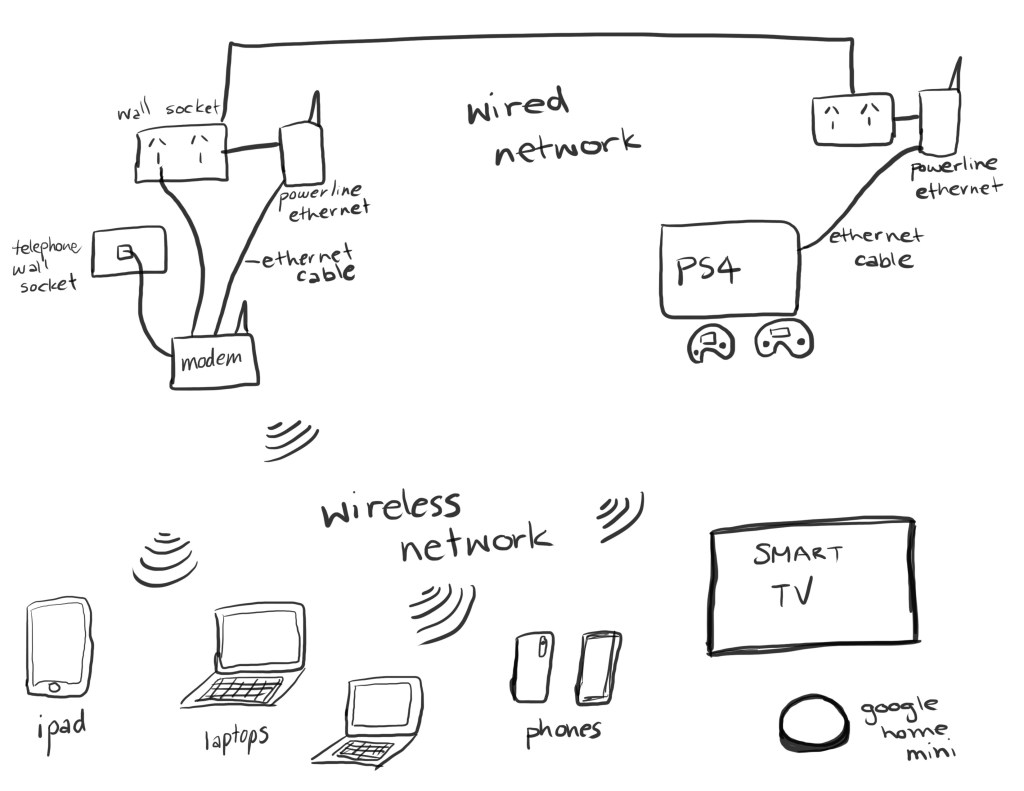
It has both wired and wireless components. The following diagram demonstrates how my home network works.
Explanation of diagram
The telephone wall socket is the beginning of the Local Area Network(LAN) for our home. It is the point where the Local Area Network connects to the Wider Area Network(WAN). A cable connects the telephone wall socket to the modem. Now historically you may have needed two separate devices, one being the modem which connects the home to the internet and the other being a router which creates the home network. However, we have a merged modem and wireless router and so we only need one device to carry out both functions. Sometimes these devices are also known to be referred to as gateways (Xfinity, 2019).
All of our devices such as our iPad, laptops, iPhone, televisions, google home mini, apple watch are all wirelessly able to be connected within our home network to access the internet and also to be able to share information between the devices.
We also have a wired network in our house for better internet connection whilst using the PlayStation. As there is only one telephone wall socket in our house situated is in the study; the wireless connection isn’t strong enough to reach the PlayStation in our living room. This results in delays when gaming. To ensure a connection with minimal latency a Powerline Ethernet adapter was placed into the wall socket in the study, which is also connected to the modem with an ethernet cable. There is another Powerline Ethernet adapter placed in the wall socket in the living room and is connected to the PlayStation with an ethernet cable. These two Powerline devices communicate with each other and deliver a stronger internet connection whilst gaming.
The following tables are some advantages and disadvantages about wired and wireless networking which is also discussed by Goodman (2019) in more depth on his tech blog.
Advantages
| Wired | Wireless |
| – Strong connectivity – Fast data upload, download speed and sharing speed – More secure than wireless | – Ease of connecting multiple devices -Ability to move around while using devices – Ease of access – Can share data easily as doesn’t need to be connected by cables |
Disadvantages
| Wired | Wireless |
| – A lot of wires and cables needed to connect multiple devices – No ease of movement with devices around the house – Limited to number of connection ports | – Can sometimes have poor connectivity – Security concerns if not password protected – Slower data sharing speeds sometimes can be obstructed by walls, furniture etc |
Each of our devices in the house is backed up either on personal external hard drives or on iCloud or Dropbox which are external cloud services. Our home network is also password protected for security.
This is a really good YouTube video explaining how a house network and other components of it work.
References
Goodman, P (2019), Wireless Network vs Wired Network: Advantages and Disadvantages. Retrieved from https://turbofuture.com/computers/Wireless-Network-vs-Wired-Network-Advantages-and-Disadvantages
Skoien, K. R (2018), Wireless Network Topologies, Retrieved from https://blog.nordicsemi.com/getconnected/wireless-network-topologies
Xfinity (2019), Router vs. Modem: What’s the Difference? Retrieved from https://www.xfinity.com/hub/internet/modem-vs-router
WydeaWonders (2007, September 14). Home Networking Ideas. Retrieved from https://www.youtube.com/watch?v=Jug9pH6V2WA&feature=emb_logo


Very good description of your home network. You have also provided an excellent overview of the advantages and disadvantages of your system. I hope you found this activity useful.
LikeLike